

Showing posts with label tweak guide. Show all posts
Showing posts with label tweak guide. Show all posts
Thursday, April 24, 2014

Saturday, April 05, 2014
How To Create Facebook Like Box Pop-up Easily (Blogger)
Create your own Facebook page like box easily for blogger and your website.

Wednesday, April 02, 2014
How To Fix Internet Connection Problem (Troubleshooting)
This Guide for Windows Users. (Beginner/Advanced)
The Internet is a global system of interconnected computer networks that use the standard Internet protocol suite to serve several billion users. Common problems may occur without notice. So as the user, we should know some basic and tools needed to fix it.

Saturday, March 22, 2014
How to Show Unused Devices in Device Manager
This also can fix your Local Area Connection renaming issues due to duplicate name in the system. Also, you may find old unused devices name and more.

Wednesday, March 19, 2014
How To Check How Many CPU Cores You Had
Check how many processor core and other system information.

Core i5 = (Multimedia, Multi-Tasking and Gaming) Quad Core (Turbo Boost)
Core i7 = (Multimedia, Multi-Tasking and Extreme Gaming) Quad Core (Hyper + Turbo)
(laptop CPU may varies)
Tuesday, March 18, 2014
Hyper Terminal For Windows 7 (Real HT Download)
(For Advance User or Networking Related)

HyperTerminal is known to configure devices (Cisco and more) like PuTTY but only available in Windows XP while Windows 7 it had been removed. So this is rip off directly from Windows XP so that you (Windows 7 Users) can use the Hyper Terminal like the good old days.
Wednesday, February 12, 2014
How To Change MAC Address Easily (Windows)
What is MAC address? Mac address is a physical serial number and every networking devices include your personal computer has a MAC address. MAC address also can give out other user on your network about your computer name and some info like computer model, network card type, and your Internet Protocal (IP) address. For more info : Google yourself..
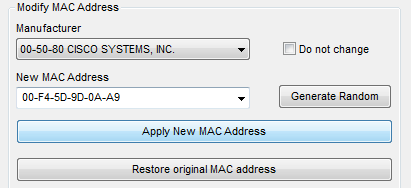
Mac Address Changer
Tuesday, December 17, 2013
How To Fix Logon Failure Account Currently Disabled (Windows XP)
This tutorial will teach you how to troubleshoot the sharing problem between Windows XP to Windows 7 or Windows 8. Example : Windows XP cannot access Windows 7, cannot access printers, shared folder, logon failure or disabled.

Thursday, December 12, 2013
How to Check Computer Security Score
Check your computer security score easily using this software, this software will determine all sectors in your computer (Networking, Security, File Sharing, Backup, Management)

Tuesday, December 10, 2013
How To Upload and Host HTML, CSS and Javascript Files
For those who want to share or host the HTML, CSS or Javascript to use in blog, widget, etc. Follow this simple trick (step by step with picture) using Google Drive (because it's free!)

Saturday, November 30, 2013
How To Protect Flash Drive Autorun
Protect USB drive with safer and protected autorun to prevent virus spreading into your machine.
Note : this will disable autorun in the flash drive & the drive name cannot be changed.

1. Download software : No installation required. Portable.
Link 1 : MEGA
Link 2 : Dropbox
Link 3 : Google Drive
Thursday, November 28, 2013
How To Disable Hibernate in Windows 7
Hibernating can cause many problems to Windows 7 users. It can cause your display to ran into blank error, dead pixel (rare). Why should hibernate anyway? Instead use Sleep.

Wednesday, November 27, 2013
How To Turn On/Off Fast Startup in Windows 8
Turn on or Turn off your windows 8 fast startup. Why turn off? Good question, the reason of hibernating can cause your PC ran into a small problem but rarely happen. It's up to you.

Tuesday, November 26, 2013
How To Add Shield Logo in Context Menu
The shield is originally from Action Center (or called LUA shield by some geeks)
Actually, these what I will give out :-

Actually, these what I will give out :-
- How to add CMD Administrator (with sheild logo)
- How to add Restart Explorer (with shield logo)
- How to add All Task (God-mode)

Sunday, November 24, 2013
How To Disable Windows Password Expiry (User Account)
Disable the expiry of a user account password (so the password will be permanent until it's changed)

Sunday, November 24, 2013
How To Show Administrative Tools in Windows 8
Show administrative tools like Disk Cleanup and so on.. (Working with Windows 8, Windows 8.1)

Sunday, November 24, 2013
How To Create Virtual Hard Disk (VHD)
Creates VHD easily by following this simple steps. (You can create many VHD as long as your HDD enough space)

-Easier to backup
-More portable, Compressible and disc space can be managed better.
-Disc Image is the size of the actual data (plus a little) and not the actual partition size.
-No need to Ghost or use Acronis.
-Volume Snap shots
Friday, November 22, 2013
How To Make Windows 8 Sign-in To Desktop Instead of Start
This working on Windows 8.1 (Tested on W8.1 Pro)
Working on Windows 8 BUT! use Start8, how? Continue reading.

Tuesday, November 19, 2013
How To Edit & Manage WIM Images (ISO) Easily
Want to delete something useless inside install.wim of the ISO's? Make it smaller and save spaces or burn the ISO's into flash drive that fit. (Tested on Windows 7, Windows 8/8.1)

Monday, November 18, 2013
How To Combine 32bit & 64bit Windows ISO
Combine x86 & x64 Vista, Windows 7 or Windows 8/8.1 ISO into single ISO and combined wim. Is it useful? Yes, because you can format PC (32bit or 64bit) easily with only 1 DVD and save spaces!
Save spaces? Yeah read more!
Save spaces? Yeah read more!

Subscribe to:
Posts (Atom)